Support

Log feeding, sleep, and diapers; follow growth curves and milestones. This page matches the app screenshots for Today, Records, Curves, and Milestones, plus sync, membership, and data help. The app is not medical advice.

Today · quick log Care timeline WHO growth curves Milestones · vaccines

App screens

Today, Records, growth curves, and milestones.

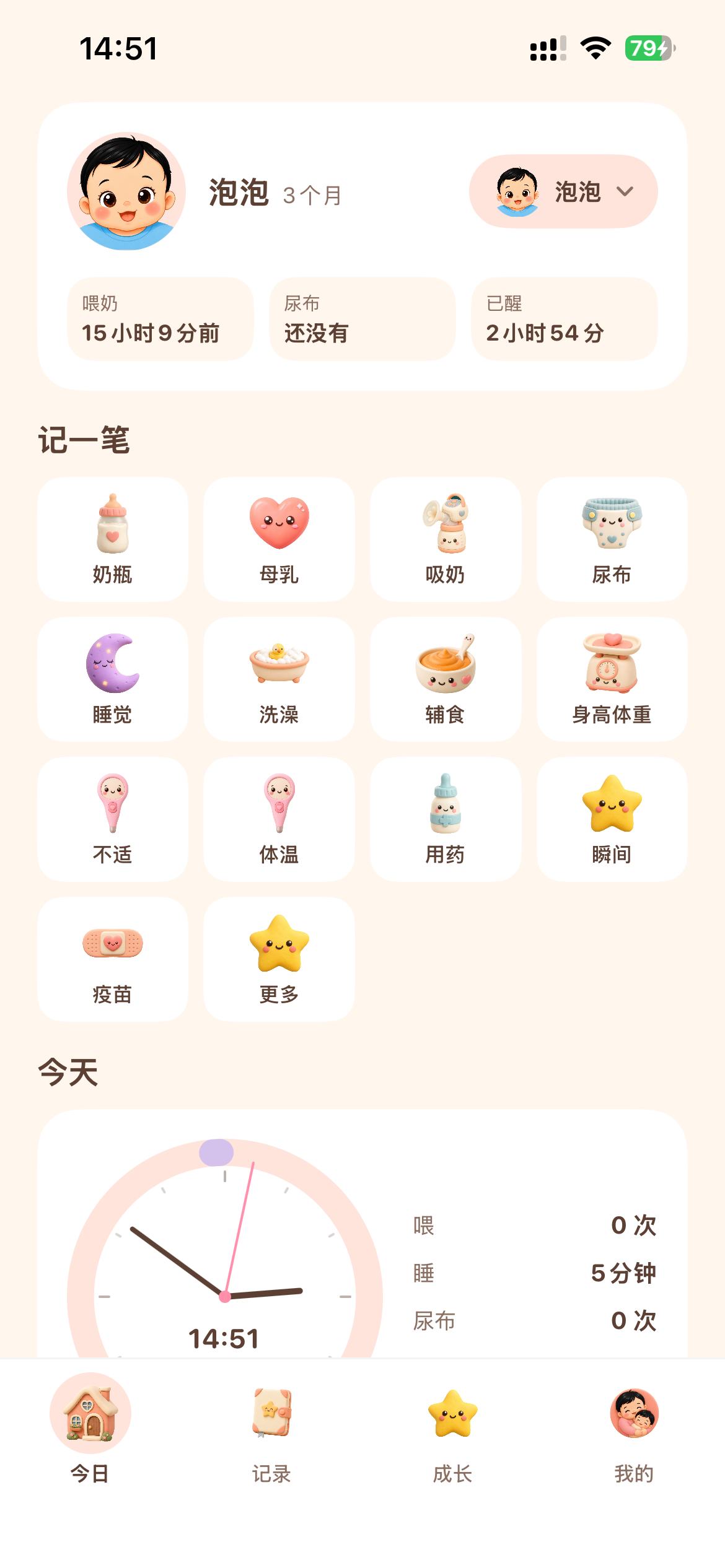
Today: baby status, log grid, and today’s clock

Today

Last feed · diaper · awake time · tap to log

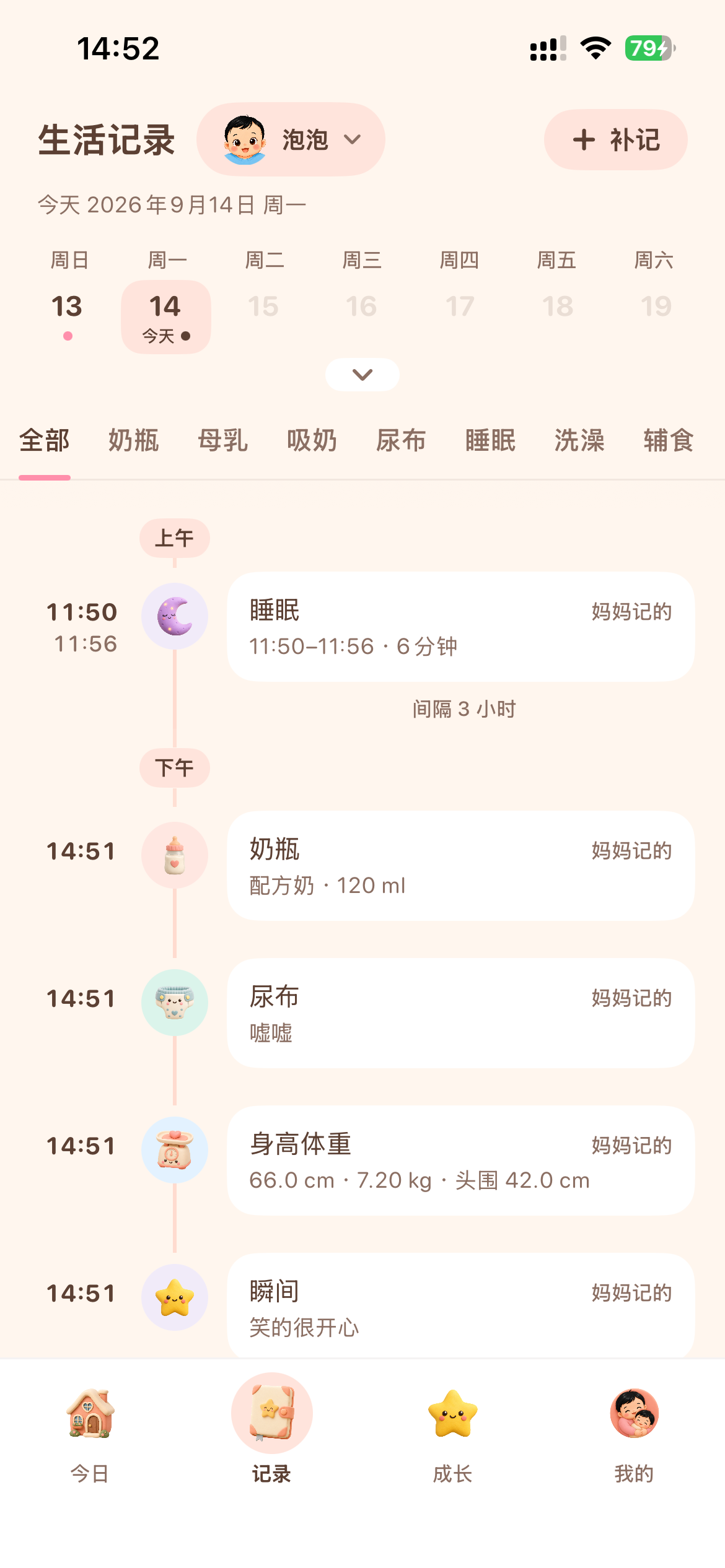
Records: week calendar, filters, and timeline

Records

Browse by day · filter · backfill

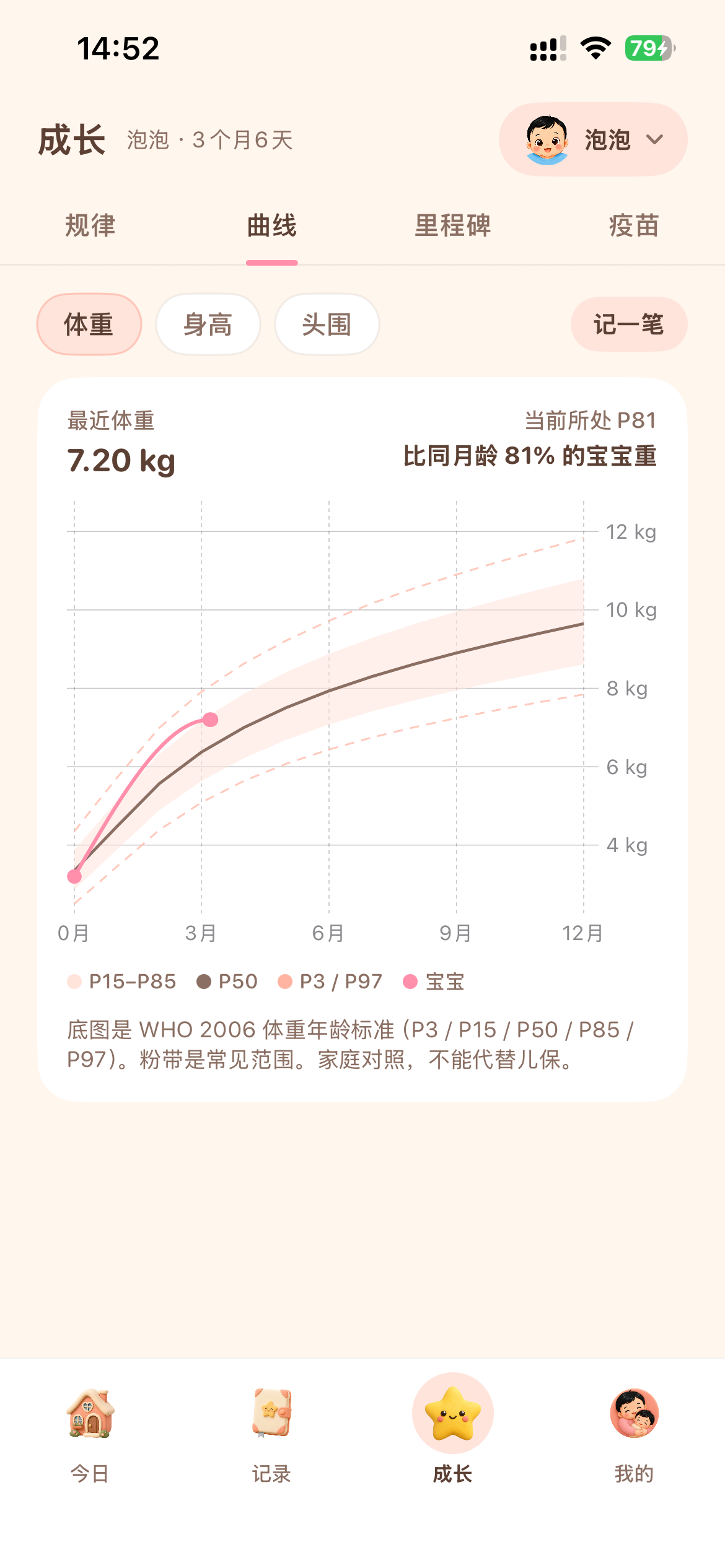
Growth curve: weight vs WHO percentiles

Curves

Weight · length · head · family reference
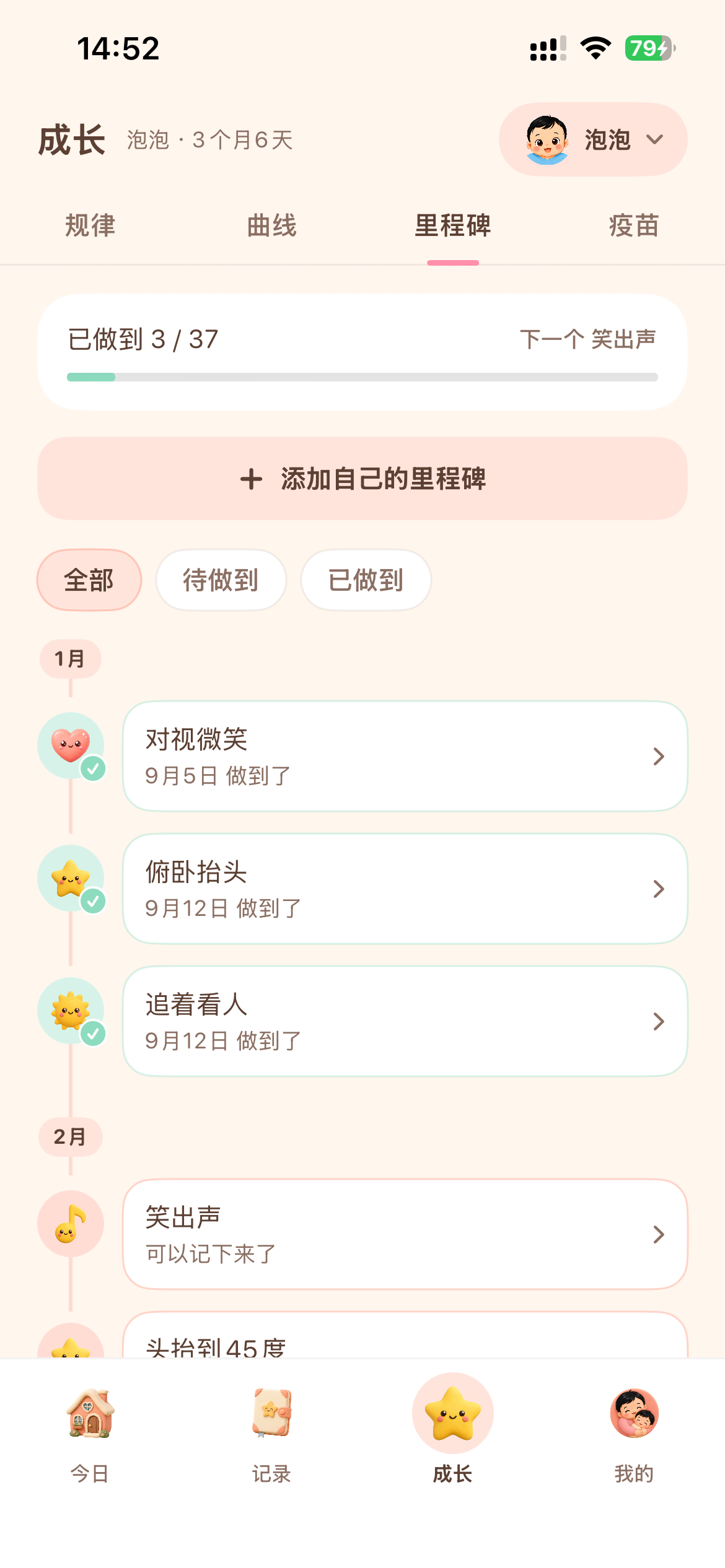
Milestones: progress and custom items

Milestones

What is done · what is next

How to use

Four tabs at the bottom: Today, Records, Growth, and Me.

01 · Today

See status, tap a tile to log

  1. The header shows the baby’s avatar and age. The capsule on the right switches profiles.
  2. Three status cards show last feed, last diaper, and how long the baby has been awake. Tap “Send to family” to share today’s card.
  3. The log grid covers bottle, breast, pumping, diaper, sleep, bath, solids, growth, symptom, temperature, medicine, moment, vaccine, and more.
  4. Use More for extra types. The clock at the bottom summarizes today’s feeds, sleep, and diapers.
02 · Records

Review the day on a timeline

  1. Switch babies at the top. Use “+ Backfill” to add a past entry.
  2. Pick a date on the week strip. Dots mark days with logs.
  3. Filter by All, Bottle, Breast, Pump, Diaper, Sleep, Bath, Solids, and so on.
  4. The timeline groups morning and afternoon and shows gaps. Tap an item to edit or delete. Caregiver names appear on the right.
03 · Curves

Compare growth with same-age peers

  1. Open Growth, then switch Rhythm / Curves / Milestones / Vaccines.
  2. Choose weight, length, or head circumference. Tap Log to add a measurement.
  3. Pink dots are your baby, the dark line is P50, and the band is a common range.
  4. The chart uses WHO 2006 standards for family reference only. It does not replace a pediatric visit.
04 · Milestones

Mark what your baby has done

  1. The bar shows how many items are done and what is suggested next.
  2. Add your own milestone for family-specific moments.
  3. Filter All / Upcoming / Done. Items are grouped by month of age.
  4. Tap an item to set the date it was achieved. Vaccine reminders are for planning; follow your clinician for shots.

FAQ

Try these steps first. If you still need help, send Feedback in the app.

Where are logs stored? Can you see them?

Baby profiles and care logs stay on this device by default. We do not upload them to our servers. They go to your iCloud Drive only after you turn on Family sync in Me. You do not need a membership to sync. We cannot view those backups.

Will records survive a new phone or reinstall?

If iCloud sync was already on, sign in with the same Apple ID, open the app, and enable sync. If sync was never on, records exist only on the original device and cannot be recovered from us.

I already paid, but membership is missing.

Use the same Apple ID, then open Me → Membership and tap Restore Purchases. Payment is handled by the App Store. If restore fails, check the network and try again later.

How do I cancel auto-renewal? What does membership include?
  • Logging, family sync, the default Home Screen widget, and the Lock Screen timer are free.
  • Membership unlocks 30-day feeding and sleep insights, custom widgets, and more than one baby profile. See the in-app list for details.
  • Monthly and yearly plans renew through Apple. Go to Settings → Apple ID → Subscriptions, find BabyLife, and turn off renewal at least 24 hours before the period ends.
  • Lifetime is a one-time purchase. Request refunds at reportaproblem.apple.com.
iCloud sync will not turn on.
  • You do not need a membership. Open Me → Family sync and turn on the switch.
  • Sign in to iCloud in Settings and enable iCloud Drive.
  • Make sure storage is not full and the device is online. Toggle the switch off and on.
  • To share one logbook, everyone needs to use the same Apple ID.
How do I send today to family?

On Today, tap “Send to family” to make an image you can send in WeChat or Messages. It shows next feed, awake time, diapers, today’s feed count, and “Search BabyLife on the App Store.” The other person does not need a membership. If you just created a profile and have not logged yet, onboarding sends an invite image instead.

Reminders, widgets, or Siri are not working.
  • Notifications: Settings → BabyLife → allow notifications, then check Me → Reminders.
  • Widgets: long-press the Home Screen to add Baby at a glance. The default layout is free. Picking your own tiles is in Me → Widgets and needs membership.
  • Lock Screen timer: it appears after you start sleep or a breastfeed. No membership required.
  • Siri: see examples in Me → Siri logging, and allow Siri and Shortcuts in Settings.
How do I delete data or the account?

Delete a log from the timeline, or remove a baby profile in baby management. Uninstalling clears on-device data. Manage iCloud backups in system settings after turning sync off. To delete the anonymous account and feedback on our servers, request it via in-app Feedback.

Are growth curves and vaccine dates medical advice?

No. Percentiles, vaccine schedules, and care intervals are everyday reference only. Follow your clinician for immunization, medication, and health decisions.

Contact us

We usually reply within 1–2 business days. Include device model, iOS version, app version, and steps to reproduce.

In-app Feedback (recommended)

  1. Open BabyLife and go to Me.
  2. Tap Feedback and describe the issue or idea.
  3. For sync, say whether iCloud is signed in and Family sync is on. For membership, say whether you have a plan.

You can also choose “Send feedback to the developer” on the App Store page.

Helpful details

Device model (for example iPhone 16)

iOS version and app version

Which tab (Today / Records / Growth / Me)

Steps to reproduce